 Flickr
Plugin
Flickr
Plugin
This plugin downloads images from Flickr website.
You will be able to download photos from your friends or your preferred
groups. Or, if you want to try to discover unexpected images, you can
even choose to download your friend's friends... or your friends'
friends' friends and so on...
To use this plugin you must have a registered account to access Flickr.
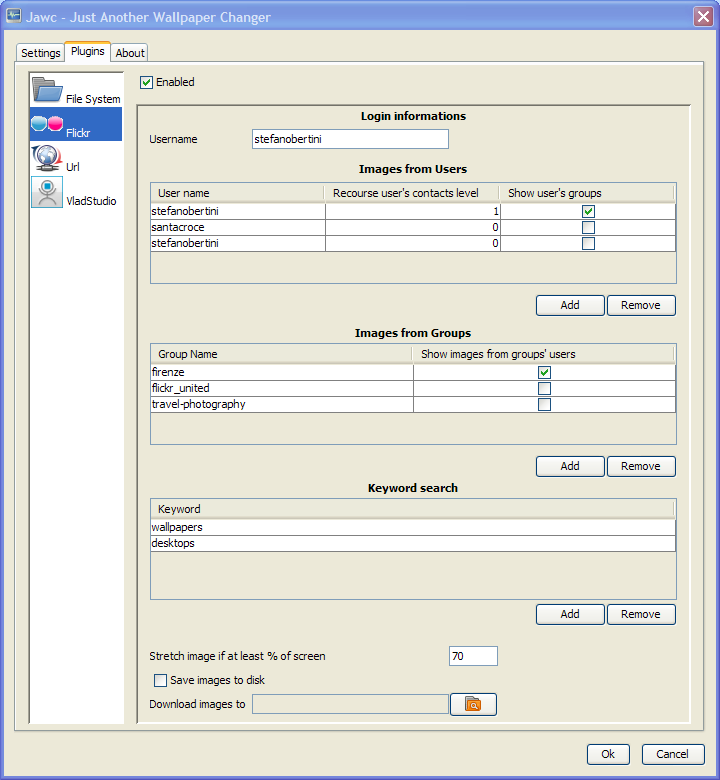
This plugin has many available options divided in three main categories:
Login informations
Username:
you must insert here your Flickr's username. The plugin needs to be
authorized to use your account so, the first time it tries to
access to Flickr, your browser will be opened and redirected
to a page in which you need to confirm your authorization.
Images from users
In
this section you can configure the users from whom you want to
download photos.
Click the add
and remove
buttons to add or remove usernames from the configuration.
For each user you can specify these options:
User name:
the username whose photos you want to download
Recourse user's contacts
level: you can use this option to decide whether you want
to download photos only from the user you specified or also from his
friends.
0 means that you want photos only from the user you specified,
1 means that you want photos from your
friend and also from his friends
2 means that you want photos from your friend, from
his friends and also from his friends' friends
and so on....
Show
user's groups: selecting this option will allow the plugin
to download images also from your friend's groups.
Images from groups
In
this section you can configure the groups from which you want to
download photos.
Click the add
and remove
buttons to add or remove groups from the configuration.
For each group you can specify these options:
Group Name: the group name whose photos you want to download.
A small note about group names: the group name you need to insert is
not the descriptive name
of the group but is the name that appears in the group's url.
For example, for the group "Firenze - Florence", whose url is
http://www.flickr.com/groups/firenze/
, the group name you should insert
is firenze.
Show
images from groups' users:
selecting this options enables the plugin to select a photo from a
group and then to select and download a photo from the first photo's
owner.
Keyword search
In this section you can configure a keyword search to find images to download.
Click the add
and remove
buttons to add or remove keywords from the configuration.
For each entry you can specify the keywords you want to search for.
Flickr plugin context menu
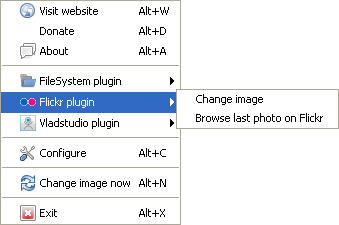
Available options in the context menu are:
Change image: immediatelly changes the current image.
Browse last photo on Flickr: opens the browser to the page containing the last downloaded photo.